If you’ve been following my blog for a while, you’ll know that I’m a huge fan of mySupermarket. So when they contacted me to ask whether I’d like a sneak preview of a new app they’d created called ‘mySupermarket Companion‘, I jumped at the chance to test it out
The beauty of this new app is that it enables you to shop on your regular supermarket’s website. The app keeps track of your shopping basket, alerting you as to whether your basket is cheaper at one of the other major supermarkets or whether you could swap some items for a different brand or multibuys in order to save money.
I trialled mySupermarket Companion last week whilst I was doing my regular online grocery shop at Tesco. While I was shopping, I kept the app tucked away in the corner of my screen by clicking on the minimise button (‘-‘). Now and then, I maximised the app (clicking on the ‘+’ button) to check my progress.
As I began my shop, it looked like other supermarkets were going to be cheaper…
…. but as I carried on adding items to my basket, Tesco became the cheapest supermarket
If you want to compare the price of a particular product across the different supermarkets, you simply click on the product’s title. The mySupermarket Companion app instantly pops up in the left-hand corner to show you the price comparison. In the example below, I could see that there were deals on my favourite pasta sauce in all the supermarkets but, this week, Tesco was the cheapest.
When I’d finished my shop, I clicked on the ‘swap and save’ pink pig to see how I could make further savings on my shop. By clicking on this button, you’re automatically sent to the ‘Saving Centre’ on the mySupermarket website where you can view your ‘swap and save’ options.
On this page you also get to see a comparison of the cost of your shopping basket across the five supermarkets. Incredibly, this week, my basket would have been most expensive at Asda! £14 more expensive! I didn’t expect that!
Once I’d selected my ‘swap and saves’, I clicked on ‘Checkout from Tesco’, then ‘Send Basket to Tesco’ on the next screen. While the basket was transferring, the Savings Pig totted up the total amount I’d saved on today’s shop… £13.14! Result!
Back on the Tesco site, I booked my delivery slot and paid. Shopping done!
So what do I think of the new my Supermarket app? Well, I LOVE IT! It’s such a useful little tool! It only takes a few seconds to download (even on my ancient laptop!) and doesn’t require any fussy installation. Next time you visit your regular supermarket web page, the mySupermarket Companion automatically appears in the bottom left hand corner. From my ‘walk through’ above, you can see how easy and intuitive it is. By keeping it minimised while you shop, it’s totally unobtrusive. As well as saving us lots of money on our grocery shopping, the tool itself is FREE to download.
For those of you that already shop online, I definitely recommend downloading mySupermarket Companion. If you do so, I’d love to hear how you get on. Leave me a comment below and let me know how much money you save in your first week!
When mySupermarket asked if I would consider writing a review of their online grocery comparison and shopping site, I was more than happy to oblige. I’d first heard of mySupermarket about a year ago when a friend recommended that I should try it out as a way of saving money on groceries (which I mentioned in this post). I was so impressed with it that I’ve carried on using it ever since. Thanks to its online comparison tools, I’ve saved a small fortune over the past year as well as a huge amount of my time.
Let me show you some of my favourite features on the site.
Speed & ease of comparing individual prices
If I want to look up the best deal on a particular grocery item, I simply type it into the Search box. With one click I can compare the prices of different brands, volumes/weights, multibuy deals and spot the cheapest. I can also click to compare the same grocery item across five different supermarkets.
This week I found that Alpro milks and Seeds of Change Pasta Sauces were on offer at Waitrose, so I made sure I stocked up.
Prior to using mySupermarket, I used to walk up and down the aisles of supermarkets trying to remember prices in order to compare them. Sometimes I found that certain items appeared on three different aisles. One such example is nuts. These often appear on the wholefood aisle, baking aisle and Asian/World foods aisle. By typing the item into the Search box on mySupermarket, I can find out in seconds which brand/volume/weight is the best value for money. This has saved me a huge amount of time and money over the past year (and oh do I hate traipsing round the aisles of supermarkets! )
If you already shop online and have your groceries delivered (like I do), you can click on the ‘Options’ tab and import your regular shopping list into your mySupermarket favourites. Each time you shop you can easily amend the basket, adding and deleting food items. If it’s your first time grocery shopping online, it’s very easy to set up your shopping basket from scratch.
On the right hand side of the webpage, you see the price of your shopping basket across the five supermarkets. The price comparison automatically adjusts every time you add a new item to the basket.
Once you’ve finished shopping, you can select your preferred supermarket and your basket will automatically be sent to the supermarket’s website where you pay and select your preferred delivery date. It’s as simple as that!
‘Swap and Save’ Function
Once you’ve finished adding items to your shopping basket, you can click on the ‘Saving Centre’ in the bottom right-hand corner of the webpage. This shows you how you can save money by swapping items in your basket to cheaper items (either cheaper brands, larger volumes/weights or multibuy deals). You simply click to swap and your basket is automatically amended.
There are a multitude of money-saving features on mySupermarket and I’ve only explored a fraction of them so far. At the bottom right-hand corner of the home page, there’s a ‘Quick Tour’ link which gives a useful overview of all the site’s features.
Thanks to mySupermarket, I’ve saved hundreds of pounds over the past year, as well as countless hours of my time. So I’d like to say a big “thank you” to the “genius” that came up with the idea for this site. It’s brilliant!
- UK friends, have you heard of mySupermarket? If so, have you ever used it?
- Friends outside the UK, do you have something similar to mySupermarket in your country? If so, I’d love to hear about it!
In recent years, I’ve been making a conscious effort to cut my personal spending. Since making the decision to leave the day job, I need to do this more than ever!
Here’s a few ways that I’ve cut back on spending so far…
-Sold my car saving £100s each year (I now walk/bike/bus)
- Stopped my gym membership saving £360 per year (I now exercise outside)
- Negotiated a new deal on my phone, reducing my monthly payments from £30 to £13.50, saving £198 per year. I’ve now got a much better deal for less money!
- Stopped buying so many clothes which is saving me £100s per year. I hardly ever buy clothes these days and, if I do, it’s usually to replace worn out items. I still love quality brands, like Kuyichi, but I’ll buy last season T Shirts etc for half price or less. I also buy from charity shops.
- Stopped buying books& magazines saving about £100 per year. Instead I’ve got an Amazon wishlist for birthdays & Christmas
These cutbacks have reduced my personal spending by well over £1,000 per year. And the funny thing is, I’m actually happier as a result of making these cutbacks. My life is simpler, less cluttered and I’m less dependent on money. However, there are two areas where I haven’t cut back, and that’s giving to charity and present-giving. These are too important to me!
Cutting Back on Family Overheads
I’ve also been sorting out the family’s finances in an attempt to cut our overheads. Here’s how I’ve got on so far…
- Switched our water from rates to a meter. We now pay £35 per month, compared to £61, saving £313 per year
- Switched our gas & electricity to a new supplier and reduced our consumption. We currently pay £79 per month, compared to £148, saving £828 per year. I check the gas & electricity deals each year now and switch if I find a better deal.
- Renegotiated our house insurance. For the same cover, we now pay £149 compared to £275, saving £126 per year. My advice is to never automatically renew your house insurance each year. You seem to get penalised for loyalty! I use comparison sites to check rates then ring my existing supplier to see if they can match it (they always do!)
- Renegotiated the mortgage. We’re now on a ‘tracker for life’ deal and currently paying 2.49%, the lowest rate we’ve ever paid on a mortgage.
- Cut our grocery bill from around £80 to £70 per week (this includes all household products, food & toiletries), saving £520 per year.
To date, I’ve managed to cut our bills by nearly £2,000 per year, which isn’t too bad considering the cost of living has increased these past few years. It didn’t take a lot of effort either. There are some great online comparison sites available now, which save time & effort. Some of my favourite sites are: www.uswitch.com, www.moneysupermarket.com, www.moneysavingexpert.com, www.gocompare.com and www.mySupermarket.com.
The one area that I still need to work on is landline telephone & broadband. We’re currently paying £109 each quarter which is way too high. I’m currently looking at Sky and Plusnet so, if anyone has experience of either of these two, I’d love to hear what you think of them
A Budget-Friendly Recipe for the Weekend
On Wednesday, I promised that I’d give the recipe for one of our favourite lentil dishes which uses Chana Dal (also known as Yellow Split Gram and Gram Dal). This lentil is a relative of the chick pea and has a lovely nutty flavour.
This dish is super duper cheap to make! In Tesco, a 2kg bag of Indus Chana Dal costs just £2.99 (and this size bag will last you ages).
The dish is mildly spiced, so perfect for all the family, though feel free to crank up the heat if you like spice! It’s also deliciously creamy. I use Alpro Soya Cream in this dish, which makes it dairy free and low in fat. I hope you enjoy it as much as we do!
Ingredients
225g / 8oz / 1 cup chana dal (aka split yellow gram, gram dal)
695 ml / 24½ fl oz / 3 cups water
½ tsp ground turmeric
1 small head of cauliflower, cut into small florets
130g / 4½ oz / 1 cup frozen peas
1 tbsp olive oil
1 thumb-size piece of fresh or frozen ginger, finely grated
1 tsp garam masala
1 tsp ground cumin
½ – 1 tsp chilli powder
1 red chilli, seeded and finely chopped (omit for children)
2 large fresh tomatoes, skinned and finely chopped
130 ml / 4½ fl oz / ½ cup non dairy cream (I use Alpro Soya Chilled Single Cream)
¼ tsp saffron strands, infused in 2 tbsp hot water (optional)
2 tbsp fresh coriander (cilantro) chopped
1 tsp sea salt, or to taste
1 tsp sugar or natural sweetener (I use agave syrup)
Toasted almonds, sesame seeds and/or finely chopped red chilli for garnish
Serve with: brown rice and/or chapattis
Method
Place the lentils in a sieve and sort through, discarding any hardened kernels or grit. Thoroughly wash the lentils. Place in a container, cover with water and leave to soak for at least 30 minutes. Rinse the lentils, drain well, and put them in a large saucepan with 3 cups of water. Stir in the turmeric. Boil uncovered for 10 minutes (skim off any froth that appears on the surface). Reduce the heat, cover with a lid and simmer for 30 minutes, stirring occasionally. Add the cauliflower and peas and continue cooking for a further 8 minutes.
Meanwhile, heat the oil in a frying pan (skillet) and gently cook the grated ginger, dry spices and chilli (if using) for one minute. Add the chopped tomatoes and continue to cook for two minutes.
Fold the tomato and spices into the lentils, along with the cream, saffron, coriander, salt and sweetener. Cook on a low heat (don’t allow it to boil) for 2-3 minutes.
Delicious served in warm bowls with a garnish of toasted almonds, sesame seeds and/or red chilli, and side dishes of brown rice and chapattis.
[This recipe has been submitted to Ricki Heller's Wellness Weekend, November 15-19 2012]
Lentils are so versatile. As well as using them in Indian dishes, we make lentil burgers, lentil loaves and add them to soups. This week I made a large batch of tomato and red lentil soup and it was lush! Lil’ L took it to school, M took it to work, and we had enough left over for dinner one evening too. You can check out the recipe here.
Do you cook with lentils? If so, I’d love to hear about your favourite lentil dish. Add a link to your recipe if possible.
Also, do you keep an eye on your finances and look for ways to cut bills? If so, I’d love to hear your tips!
Right, it’s Friday night and the weekend has officially begun Time for me to sign off!
Take one seeded ciabatta (£1 for a pack of 4 in Tesco)
Mix a little olive oil with 1 clove of crushed garlic. Cut the ciabatta in half and brush with the oil.
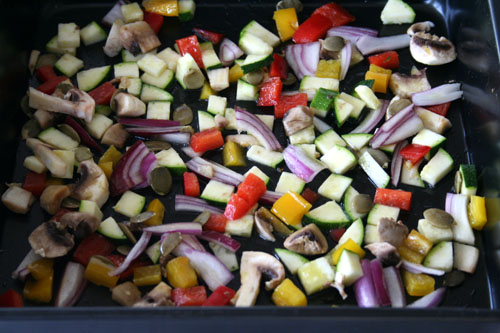
Finely chop a mix of veggies (I use red pepper, yellow pepper, red onion, courgette (zucchini), mushrooms). Tip the vegetables into a roasting pan. Add a sprinkling of pumpkin seeds and a drizzle of olive oil. Mix to coat the veggies in the oil.
Aren't they beautiful?
After the veggies have been in the oven for 5 minutes, add the ciabatta (cut side up). Cook on for a further 5 minutes then remove from the oven and assemble.
Voila! A super quick, cheap, delicious lunch
This ciabatta could easily be elevated to ‘dinner’ status by adding a little pesto, and a nice salad side dish or bowl of crispy kale
For more budget busting meals, check out my Recipe section. All the dinners are super cheap to make, costing pence rather than pounds per portion (even using organic ingredients!)
My favourite budget-busting meal has got to be dhal and chapatis. It’s so cheap to make and so tasty! It’s one of the family’s all-time favourite meals. What’s your favourite budget busting meal?
I’ve just been into Bath and, to my horror, discovered that the shops are already full for Christmas stuff AND the street Christmas lights have been installed. Has the world gone bonkers? It’s the beginning of October for goodness sake!! Is the commercial world on a mission to hijack Christmas? Mmm that’s my suspicion… What do you think?
This shop is actually open all year round! Madness! (IMO)
However, seeing the Christmas lights did remind me that, in the next 3 months, I’ve got some fairly big expenses coming up… Lil’ L’s birthday at the end of this month; a potential trip to stay in Nottingham Forest during half term; M’s 40th in December and then, of course, Christmas. So, when I spotted Laura’s Big Budget Challenge on Sarah’s blog, I jumped at the chance to join in.
The Big Budget Challenge is running for the months of October and November. The idea is to set our own rules and keep track of our budgeting progress through our blogs. Laura will do a weekly round up of all budget-themed posts, so we can share ideas on how to save money.
Aside from mortgage and bills, food is our single largest expenditure, so this is where I’m going to try and make the most savings. However, I’m not going to make any compromises on the quality of the food we eat. We’re still going to eat organic as much as possible, lots of fresh fruit and veggies, and no junk.
Here are the rules I’ve set myself:
Avoid waste. I’m going to have a big sort out of the pantry, fridge and freezer and use up anything that has been languishing there for a long time. I’m also going to make sure that I use up all the fruit and veg before they’re ready to jump on the compost heap.
Shop around for the cheapest deals. A friend of mine used the site http://www.mysupermarket.co.uk/ and saved £30 on her weekly shop by switching supermarket. I must give this a go!
Make use of home-grown foods. We’ve got tons of apples at the moment, so I’m going to try and make lots of interesting desserts and snacks using the apples, rather than buying desserts or lots of other fruits.
Go foraging! I love the idea of wrapping up in warm clothes and boots, going out for a brisk walk… and coming back laden with free goodies. I can’t wait to see what I can find! There’s lots of useful info on foraging on the web.
Make use of vouchers and deals. On Friday nights, we usually go out for a meal. It’s a great way to end the week and catch up with each other. For the next couple of months, I’m going to make use of websites such as Martin Lewis’s Money Saving Expert to find money-off coupons and 2-4-1 deals on restaurants. I’ll also make use of my Tesco vouchers by converting them into restaurant tokens (each £1 voucher is worth £3 in selected restaurants so it’s a great way to use them).
At the end of each month, I’ll check my credit card bill and see how much I’ve spent on groceries. I’ll then compare it with previous months to see if I’ve made any savings.
Can you think of any other ways I can save money on food (without compromising on quality)? If so, I’d love to hear them.
Also, I’d love to know what you think about the early onset of Christmas paraphernalia in town. Do you think it’s right to start stocking the shops and hanging Christmas lights in October? Perhaps it’s just me that’s all ‘bah hum bug’
Hi. I'm Sharon. Originally from Essex, I now live in Bath with my hubbie and 9 year old son (Lil' L). This is a blog about the stuff I'm currently passionate about, including my journey into the world of whole food plant-based cooking. All recipes on this site are family- friendly and have been road-tested and approved by Lil' L.